
Published: September 01, 2026
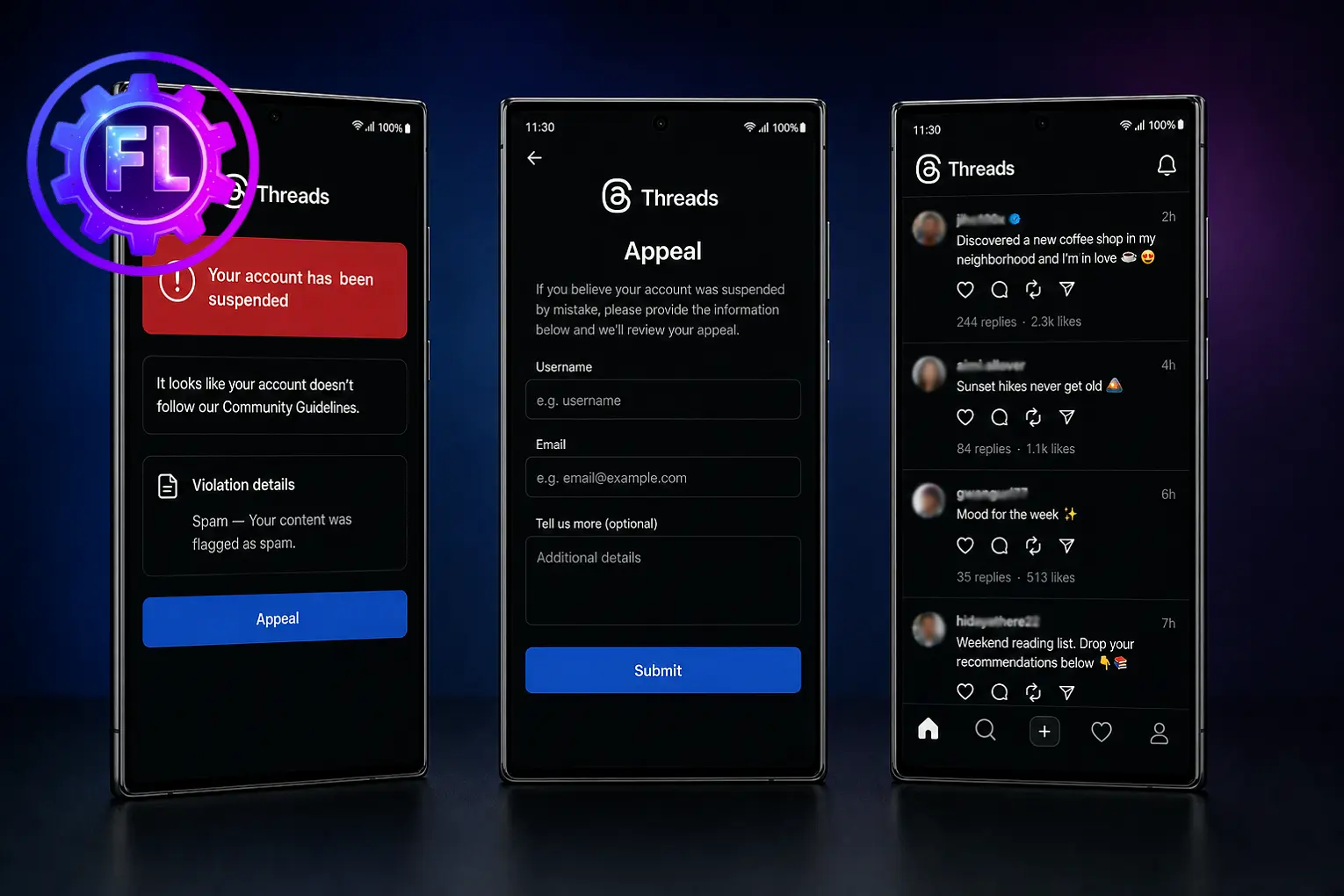
If Meta has flagged your account for a violation and your Threads account has been suspended, you can appeal the decision and ask for your account to be reviewed. By submitting an appeal form, you can request that Meta reconsider the suspension. If your appeal is approved, your account will be restored.
Before submitting an appeal, it is important to understand what steps you should take to get your account back and avoid running into the same problem again. You should also understand the policies that apply to Threads so you can avoid similar issues and keep your account in good standing in the future.
We have included some possible fixes at the beginning of this guide so you can check for a solution before going further. You may be able to resolve the issue before moving on to the appeal process. Then, we will take a closer look at why Threads accounts get suspended and what you can do next.
How to Submit a Threads Account Appeal
Open Threads and tap your profile icon. Tap the three-line menu in the top-right corner, then go to Settings → Account → Account Status. This page shows the reason for the violation and, if you are eligible, gives you the option to request a review.
Once you submit your appeal, Meta will review your account and make a decision. When the review is complete, you will receive a confirmation email with the result. If your appeal is approved, your account will be restored.
If your Facebook account is disabled, similar appeal and recovery steps apply — see Facebook Account Disabled? for the full process.
Why Is Your Threads Account Suspended?
Threads can take action against an account when its activity goes against Meta’s Community Standards or platform policies. This includes posting images, videos, or other content that violates the rules, repeatedly sharing the same post, or sending people unwanted content through messages that they dislike or report.
Spam-like behavior is another common reason for action. Using automation tools or engaging in activity that appears unnatural can put your account at risk. Suspicious login activity, especially from a new device or location, can also trigger a security restriction.
A minor violation may only result in the removal of the content. However, repeated or serious violations can lead to stronger action, including account suspension. If Threads gives you the option to appeal, Meta will review the decision. If the account qualifies for restoration, it will be reactivated; otherwise, it can remain permanently disabled.
Do This Before You Appeal
Check your email. Meta sends a suspension notice to the email linked to your account. It explains what happened and usually lists the reason for the action, such as Spam, Hate Speech, Fraud, or Invalid Activity, along with the date it was detected.
Look for the Request Review button. If it is included in the email, click it to go directly to the appeal page and request a review of the decision.
Understand what you can and cannot do. Your account remains locked during the suspension, so you cannot delete posts or make changes. You can review or remove content only after you regain access.
How Long Does a Threads Appeal Take?
Meta does not provide a guaranteed timeline for appeal reviews. The time it takes can vary depending on the type of violation and the number of requests being handled.
Once a decision is made, you will receive an email at the address linked to your account. Check your inbox and spam folder so you do not miss the response.
For more details, see the Instagram Help Center.
If the Appeal Fails, What’s Next?
If your appeal is rejected, the suspension will remain in place. In most cases, there is no second option to request a review of the same decision.
Do not create a new account to get around the suspension. Meta can connect accounts using information such as your email address, phone number, or device, and trying to bypass an enforcement action can lead to further restrictions on related accounts.
Be careful with third-party account recovery services. No outside company can guarantee that it can restore a suspended Threads account, so be cautious of anyone who promises to get your account back for a fee.
FAQs
Can I use Threads on the web while my account is suspended?
No. You will not be able to use your suspended account on either the Threads app or the web. Access is restored only after the suspension is lifted.
Will my Threads posts and followers be deleted during a suspension?
No. A suspension does not automatically delete your posts, profile, or followers. Your account remains on Threads while Meta reviews the case. If the suspension becomes permanent, Meta may eventually remove the account and its content.
Can I appeal from a different device?
Yes. You can use another device to submit your appeal. Just make sure you log in to the suspended account or use the appeal link sent to the email connected to it.
Does deleting the Threads app cancel my appeal?
No. Deleting the Threads app does not cancel an appeal you have already submitted. Your appeal is handled through Meta’s system, not through the app on your phone.
What happens to my Instagram account if Threads is suspended?
Usually, your Instagram account will not be affected by a Threads suspension. However, serious violations of Meta’s Community Guidelines can also lead to restrictions on other connected accounts. If your Instagram account has also been disabled, our [Instagram account appeal] page explains the available review options.

- Galaxy S26 Ultra Wireless Charging Stuck at 10W/15W - September 17, 2026
- How to Fix Google Maps Showing Wrong Directions and Inaccurate Location - September 13, 2026
- iPhone 16 Camera Not Working? Fix Black Screen, Crashes & Blurry Photos - September 9, 2026
